🎲 NEW: Free Craps Simulator on Gamble Galaxy!
Want to learn Craps without risking real money?
I've updated the Gamble Galaxy Craps Simulator to behave much more like a real Craps table, with proper betting rules and payouts.
🎯 Pass Line & Don't Pass
🎲 Place bets — 4, 5, 6, 8, 9 & 10
💰 Come & Don't Come bets + Odds
🔥 Hardways
⚡ Field & Proposition bets
📊 Bankroll tracking & statistics
🤖 Strategy testing & simulations
🎓 Training mode for learning how Craps works
It's completely FREE to use — no real money needed.
👉 gamble-galaxy.com/freetrackers/craps-simulator.html
Try a strategy, roll the dice and see how long your bankroll survives! 🎲
#Craps #CrapsStrategy #CasinoGames #CrapsSimulator #GamblingStrategy #Casino
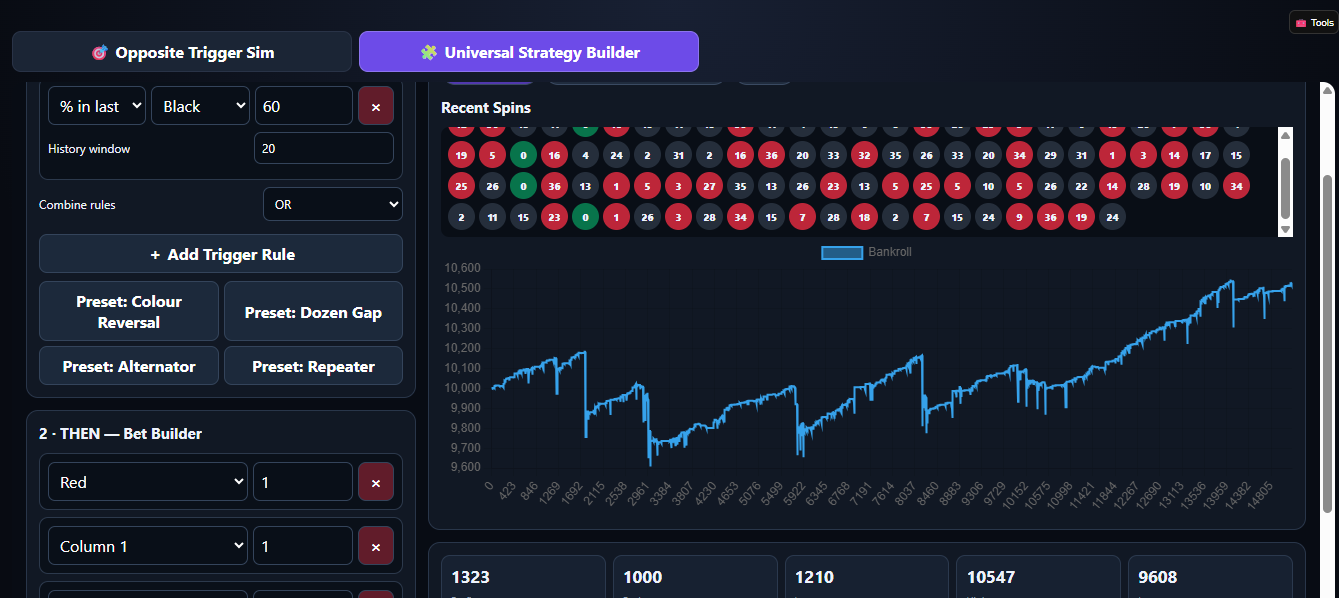
The red black mafia roulette strategy simulator ! --- A strat that everyone's invented !!!
Test it all here:
https://gamble-galaxy.com/freetrackers/redblackrows.html
ℹ How this betting test works
The simulator watches the roulette history for an unusually strong run or percentage of one colour. When a trigger is reached, it bets against that colour imbalance on the next spin, using one colour bet plus two 12-number columns.
When BLACK triggers
The next bet is RED + Top column + Bottom column. The Top column is the red-heavy column (8 red / 4 black), while the Bottom column is balanced (6 red / 6 black).
When RED triggers
The next bet is BLACK + Middle column + Bottom column. The Middle column is the black-heavy column (8 black / 4 red), while the Bottom column is balanced (6 red / 6 black).
Why three bets?
The colour bet pays 1:1 and each 12-number column pays 2:1. All three components use the same progression stake. At progression step 4, for example, the simulator stakes 4 on the colour + 4 on the first column + 4 on the second column = 12 chips total.
Possible result types
Profit: enough of the three components win to finish the spin above the starting stake. Push: the combined three bets finish exactly 0. Partial loss: the combined result is below 0 but not all three stakes are lost. Full loss: all three components lose, including when zero lands.
Triggers & progression
You can trigger from a consecutive colour streak, a colour percentage over a chosen history length, either condition, or both. The default progression is 1, 2, 4, 8, 16, 32, 64, 300 per component. The Profit / Push / Partial Loss / Full Loss controls decide whether that progression resets, repeats or advances.
This is a simulation/testing tool. Roulette outcomes are independent, so a streak or historical colour imbalance does not make the opposite colour more likely on the next spin. Progressions can increase stakes and drawdowns very quickly.
We've just launched a completely new Roulette Tournament system on Gamble Galaxy!
Members can now create their own roulette tournaments, invite other members to join and compete to see who can finish with the biggest bankroll.
And the best part...
📱 Mobile players and desktop players can compete in the SAME tournament! 🖥️
You don't all need to use the same version of the roulette simulator.
Create or join a tournament using the desktop Roulette Simulator, or play using the Mobile Roulette Tracker — everyone is competing in the same tournament and the results all go onto the same leaderboard.
How does it work?
When creating a tournament you can choose:
🎯 5–100 spins
💰 100–10,000 starting chips
👥 The number of players allowed to join
🏷️ Your own tournament name
Once players have joined, the tournament creator starts the tournament and everybody can play their spins.
Each player starts with the same number of chips and gets the same number of spins.
The aim is simple:
💰 Finish with the biggest bankroll!
Your progress is saved as you play, so refreshing the page doesn't give you another set of spins or reset your tournament.
When everybody has finished, you can view the final leaderboard and results chart to see who won. 🏆
You can also add a description of the roulette strategy you used after playing, so other members can see how you approached the tournament.
👤 Tournament activity is also shown on Gamble Galaxy profiles.
You can see tournaments a member has created as well as tournaments they've joined and played.
🔗 Tournaments can also be shared directly with other players using their tournament link.
And if somebody opens a desktop tournament link on their phone, Gamble Galaxy automatically takes them to the mobile version of that same tournament.
🎁 FIRST OFFICIAL TOURNAMENT — WIN £10!
Now that testing is complete, all of the test tournaments have been cleared and our first proper tournament is open:
🏆 Winner of this tournament wins £10! paid by site_admin
The player who finishes the tournament with the highest bankroll wins £10, paid by site_admin.
👉 https://gamble-galaxy.com/tv10/tournaments.html?tournament=11
Join the tournament, play your spins and see if you can take the top spot! 🎰🔥
Good luck everyone!
🏆 Let the Gamble Galaxy Roulette Tournaments begin! 🏆
The triggersV10 roulette sim is now £4.99 a month to use but you can use and enter tournaments free !!
Check out how it all works here
https://gamble-galaxy.com/tv10/tournaments.html
We've added another small upgrade to the new Gamble Galaxy Roulette Tournament system. 🎰
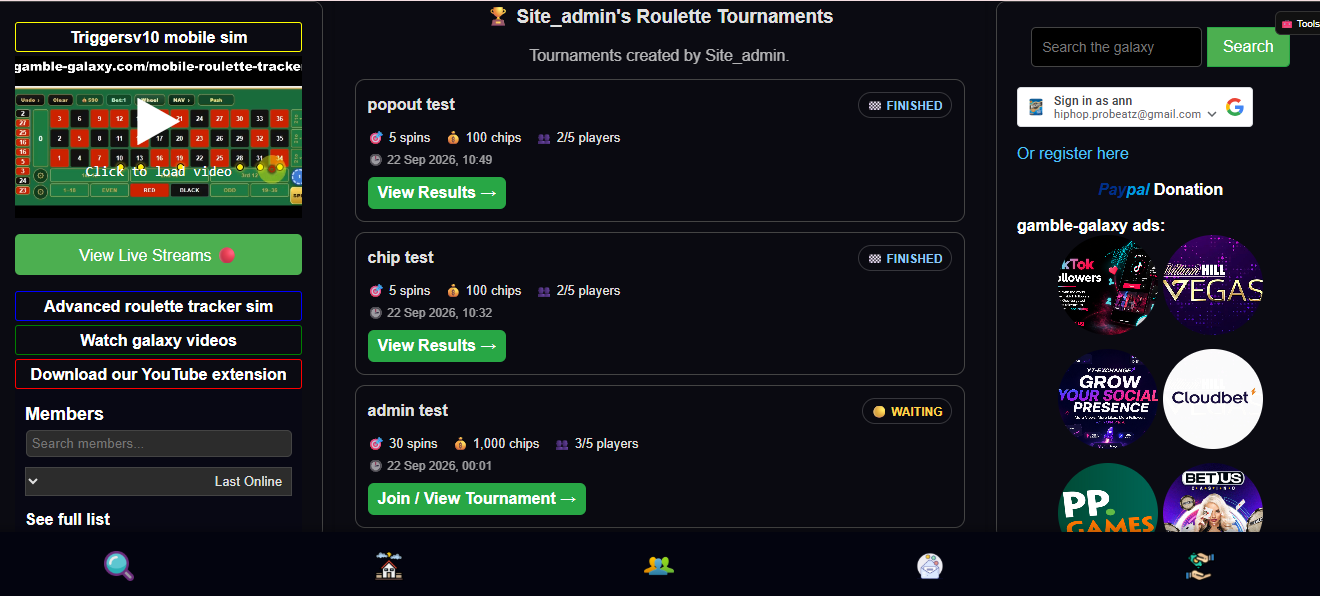
When a member creates a Roulette Tournament, it will now automatically appear on their Gamble Galaxy profile.
The new tournament section shows:
🏆 Tournament name
🟡 Waiting / 🟢 Active / 🏁 Finished status
🎯 Number of spins
💰 Starting chips
👥 Number of players
🕒 Tournament date
There's also a direct button to join/view an active tournament or check the results of a finished one.
The latest 10 tournaments created by that member are displayed automatically, giving everyone their own little tournament history on their profile. 😎
Create a tournament, share it with the community and it'll become part of your Gamble Galaxy profile! 🏆🎰
🏆 NEW: Roulette Tournaments Are Now Live!
We've added a brand-new Roulette Tournament feature to the Gamble Galaxy Roulette Simulator! 🎰🔥
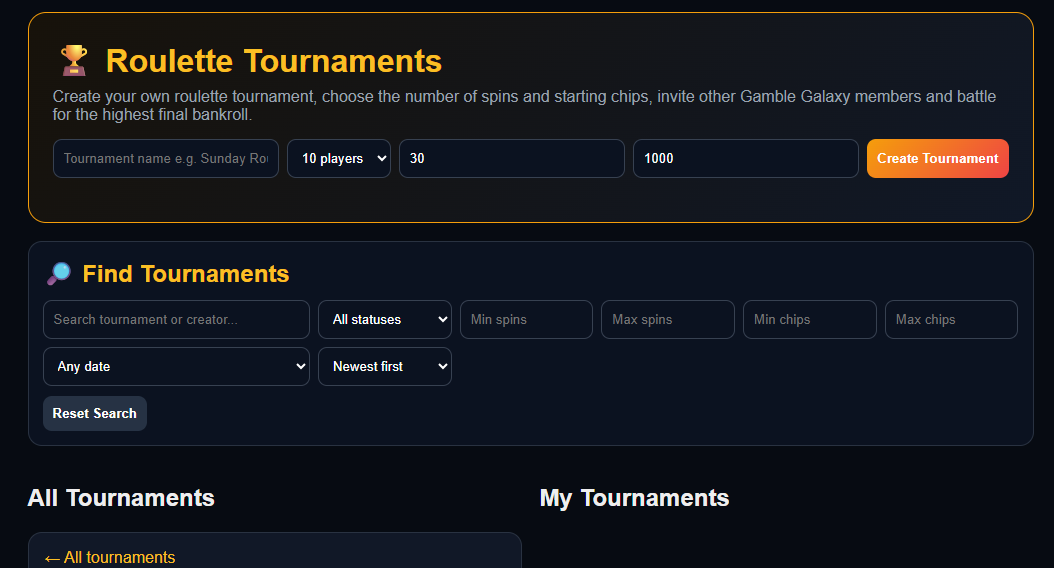
You can now create your own roulette tournament, invite other Gamble Galaxy members to join, and compete to see who can finish with the biggest bankroll.
It's completely for fun — no real money or prizes involved. Just chips, competition and bragging rights! 😎
🎰 HOW DOES IT WORK?
Creating a tournament is simple.
Choose:
🏆 Your tournament name
👥 Maximum number of players
🎯 Number of spins
💰 Starting chip balance
You can create anything from a quick 5-spin tournament to a much longer 100-spin battle.
Tournament settings allow:
🎯 5–100 spins
💰 100–10,000 starting chips
👥 Up to 50 players
The classic setup of 30 spins and 1,000 chips is still there as the default.
👥 INVITE OTHER PLAYERS
Once you've created your tournament, you'll get your own tournament page and shareable link.
Copy the link and post it on the forum, send it to friends or share it wherever you like.
Other logged-in Gamble Galaxy members can open the link and join your tournament.
Before the game begins you'll be able to see everyone who has entered.
🚦 THE CREATOR STARTS THE TOURNAMENT
The tournament doesn't begin immediately.
Players can join first, and when you're ready, the person who created the tournament presses:
▶ START TOURNAMENT
Once the tournament starts, entries are closed and everyone can begin their own game.
🎰 PLAY ON THE NORMAL ROULETTE SIMULATOR
There's no separate complicated tournament game to learn.
Press:
▶ PLAY TOURNAMENT
and you'll be taken directly to the normal Gamble Galaxy Roulette Simulator.
You'll see a small:
🏆 PLAYING TOURNAMENT MODE
box in the top-left corner.
This shows your current:
🎯 Spins played / total spins
💰 Current bankroll
You can open or close the box so it doesn't get in the way of the roulette table.
Then simply place your bets as normal and use Quick Spin.
Your tournament progress is automatically recorded after every spin.
🔒 YOU CAN'T JUST REFRESH AND START AGAIN!
Tournament games are persistent.
If you've played 12 of your 30 spins and refresh the page, you don't suddenly get another fresh 1,000 chips and 30 spins.
You'll return to your tournament game with your progress and bankroll saved.
So once you've started your run, you're committed to it! 😈
🏁 FINISH YOUR SPINS
When you've used all of your tournament spins, your game is complete and your final bankroll is locked into the tournament leaderboard.
For example:
🥇 Player 1 — 2,340 chips
🥈 Player 2 — 1,780 chips
🥉 Player 3 — 1,420 chips
4️⃣ Player 4 — 760 chips
The player who finishes with the highest bankroll takes the top spot. 🏆
📈 SEE HOW THE TOURNAMENT PLAYED OUT
Finished tournaments also include a bankroll chart showing how the players performed throughout the game.
You can see who started strongly, who went backwards, who made a comeback and how the battle developed across the tournament spins.
It's a really cool way of comparing everyone's different betting runs.
🔥 CREATE YOUR OWN ROULETTE CHALLENGES
The custom settings mean we can now have all kinds of community challenges.
⚡ 5 Spins / 100 Chips — quick-fire challenge
🎰 30 Spins / 1,000 Chips — classic tournament
💰 50 Spins / 5,000 Chips — bigger bankroll battle
🏆 100 Spins / 10,000 Chips — marathon tournament
Or make your own rules and challenge other Gamble Galaxy members to beat you!
This is the first version of Roulette Tournaments, so we'll keep improving it as people start playing and testing it.
Create a tournament, share your link and see who can finish at the top of the leaderboard. 🏆🎰
Good luck!
— Gamble Galaxy
https://gamble-galaxy.com/tv10/tournaments.html